• Skip to secondary menu
  • Skip to main content
  • Skip to primary sidebar
  • Skip to footer

Journey Tool Kit

Just another WordPress site

  • Home
  • Life Tools
  • Tech Stuff
  • Travel Tools
  • Travel Blog
  • Other Tools
  • Contact

Other Tools

Things to Consider When Hosting a DIY Company Event

January 23, 2020 by Jaime


Convention Center, Chair, Seminar, Multi Colored

Workplaces have seen countless events and celebrations. Anniversaries, promotions, town halls, corporate social responsibility activities, and many more all call for togetherness. The bigger the size of the event, the harder it becomes to manage. So, if you have taken on the task to organize an event, you can follow these tips:

Attendees

Many tasks are dependent on the headcount, such as venue, food, budget, prizes, and activities if there will be any. As such, it is essential to determine the number of attendees, which will happen at least twice. First, during the initial planning stage to determine the size of the venue, and second, during the execution stage to finalize the headcount.

Theme and decorations

Determine if the event requires a specific theme. If it does, communicate the proper dress code to the attendees. Consider if banners, promotional materials, and additional LCD screens are required. Also, decide on the decorations that will grace the stage.

Venue and budget

Now that you have the number of attendees anticipated to attend the event, you can pick the date and the venue. Some functions will be within the premises of the company. If this is not the case, create a proposal for two or three places. Also, determine how many free parking slots are allocated for your attendees.

The budget proposal should include all the expenses necessary to make the event happen — forecast unbilled expenditures. Once the plan is approved, make the appropriate bookings and reservations.

Invitations

Now that you’ve made the reservations, you can now send the invites detailing the venue, schedule, and dress code. If you are emailing the invite, make sure that you ask the attendee to confirm or reject it as appropriate. Their confirmation will help you finalize how many you can expect at the actual event.

Program

Draft the program to include the essence of the event. In this phase, determine if additional invites will have to be sent to notable speakers and inform them of the FAQs regarding the event.

Food and beverages

Consider people who follow a strict diet. A standard selection should include beef, chicken, fish, vegetables, and dessert. If you are ordering food, do this in advance. Remember to provide enough cutlery for everyone.

Visual, lighting, and sound

If the workplace is not the location for this event, hire people who will take care of the lights, projectors, and sound system for a smooth flowing program.

Photographer

Nowadays, taking photographs is a staple for events for personal and professional documentation. Larger events are likely to need professional photographers. If this is the case, the proposed budget will also have to include this.

Once the event ends, you will be left with after-party trash. Handle this like a pro by hiring the services of Evergreen Junk Removal in Boston for a sweat-free clean-up.

Planning an event could be stressful at worst and fulfilling at most. The fulfillment comes when everything is managed correctly. Efficient event planning is never an accident, so follow these steps and enjoy the process.


Filed Under: Other Tools

Basketball Rules And Scores

March 16, 2018 by Jaime

Basketball is one of the most popular sports in the entire world and the most popular sport in United States – even its popularity surpasses online games like angry bird and candy crush. The game of basketball was invented by James A. Naismith in Springfield, Massachusetts, in order to promote physical activity among his students in winters. The sport combines physical strength, mental strength and coordination.

Although there are more than 100 Million basketball players across the globe, the game of basketball is skill flexible enough to let every player have their own individual playing style. Basketball players and basketball fans both are in popular crowds and this game is these days played by the greatest athletes and brings spectacular joy and thrill to the fans. One can watch basketball games on CBS Sports.

One can also watch games and view live basketball scores by downloading best sports scores app from the play store or the apple store. One can even easily find free basketball app on the internet. Although there are many rules of the game but all comes down to just one idea which is to throw the ball into the hoop. A few basics of the basketball game are listed below:

Dribbling

In this technique of basketball, the majority of the ball handling is done by the point guard and all the players keep on moving forward alongside while the ball handler dribbles the ball very competently. One can use one hand at a time to dribble the ball and one should not stare at the ball while dribbling because one has to see the other players and the court not look at the ball. With enough practise it becomes very easy like when one is walking he doesn’t look at his legs he looks forward.

Shooting

Since the main thing about the game is putting ball through the hoop, shooting is a skill which can be learned, and more the one practises, the percentages of ball getting in the hoop increases. One has to get the proper lift, release ball properly, put proper back spin and exactly right amount of power in the shot.

Defence

When one has finished shooting then the time comes for him to defend when opponents shoot. The basic idea in defence strategy is to stay in front of the opponent and ball, one can use his arms to shield larger area and do everything in his power to avoid committing a foul and touching opponent. Playing defence is all about anticipating the movement of the opponent.

Passing

This strategy of the basketball game involves finding an open man when one has the basketball and cannot move further due to defence of opponent team. Passing needs to be very fast and very accurate otherwise one’s team can lose the opportunity of scoring a basket. One should not hold on to the ball for very long or dribble for a longer period of time. The faster one can pass to a teammate who is not surrounded by the defence players, the more is the chance of scoring the basket.

Filed Under: Other Tools

Building Your New Home: Six Considerations

October 19, 2017 by Jaime

Building a new home can be an exciting undertaking. You may know exactly how you want your new house to look and what modern conveniences you want to enjoy once the construction is finished. Making your dream a reality can require you work closely with your contractors and keep several important tips in mind. Being proactive in the project can ensure your contractors build you the house of your dreams.

Draft a Budget and Know How Much You Can Afford
Before any building can begin, you must first have your budget set aside and obtain any financing needed for this massive project. Having your budget finalized before the contractors begin their work will help you know what you can afford.

Check Your Builders’ References
Before you hire any contractors, it is imperative you check each builder’s references. Look for contractors who are licensed, bonded, insured, and can provide several references to back up their claims of providing outstanding services. You should not be afraid to pay a bit more for a contractor’s services if this individual has stellar reviews. You can usually check their review online. For example, if you wanted to find a good electrician near you, you would search for ‘electricians London’ for example, and from their you can see their reviews and rating, allowing you to determine if they are good or not.

Embrace Green Technology
Today’s homebuilding contractors specialize in using green technology. These technological advancements let you build a house and enjoy the savings that green building inventions can bring. Using recycled materials, solar panels, and other advancements, you may save money when buying building materials and when it comes to time to pay utility bills on your new home.

Think About Future Resale Value
While you may have no plans to sell your new home in the future, you should still plan your building project with the house’s resale value in mind. If you need to sell your house at some point, it will be to your advantage to utilize the best resources and materials in this project. Doing so could guarantee you a higher home resale price.

Plan for Repairs
Your home will not be finished until all of the damage inflicted during the building process is repaired. If you need roof repair Kansas City contractors can review the damage and replace the shingles or lay new roofing if necessary. Repairs prevent future problems with the home’s integrity.

Be Flexible When Necessary
Being able to adjust your plans as needed can help your house get finished faster. When materials are not available or work gets behind schedule, you should remain open to plan adjustments and stay emotionally calm to ensure that the work gets done to your satisfaction.

Filed Under: Other Tools

How to Edit Your Photos on a Mac

September 13, 2017 by Jaime

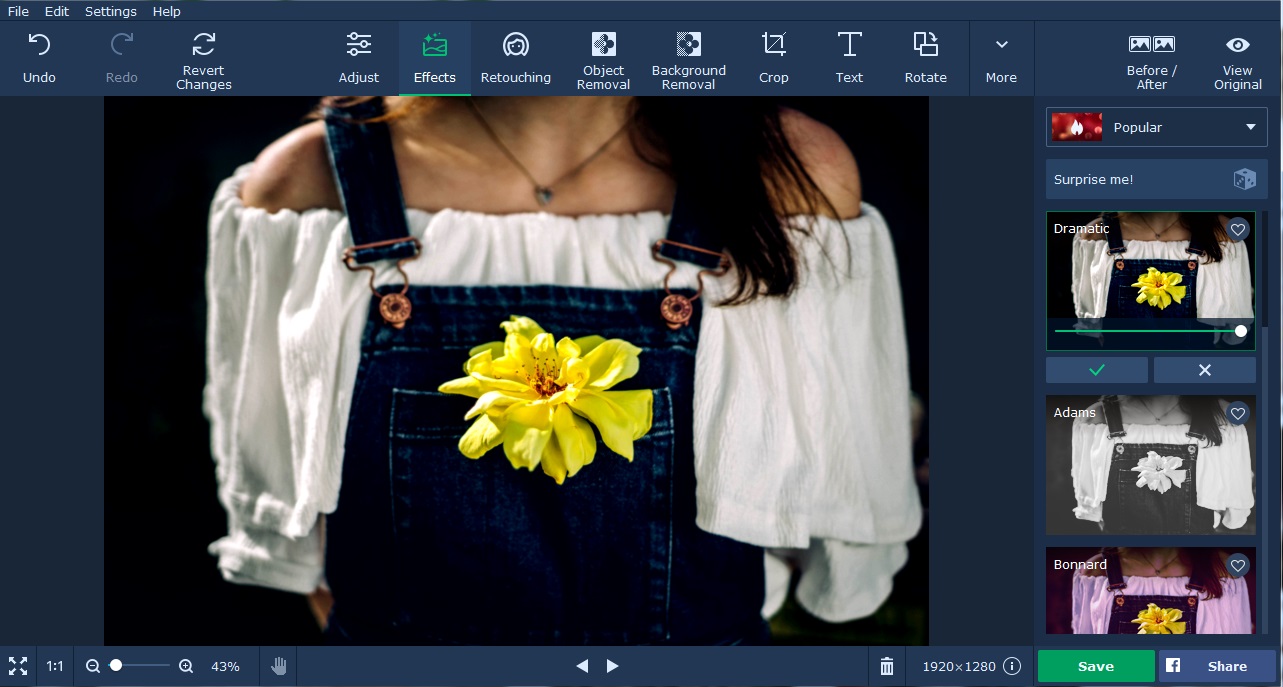
Most of the time, the photos that you take are not perfect because of many reasons. For example, you can’t hold the camera still and end up taking a blur photo. Sometimes, there are too much light or shadows in the photo because of the inappropriate lighting in the room. Often, when you take photos, some objects that should not be there end up in your photo. However, you don’t need to worry about any of these because all these can be fixed by simply editing them on a basic photo editor like Movavi Photo Editor for Mac.

To edit a photo, you must first download Movavi Photo Editor for Mac from Movavi site. After that, you must drag the photo into the work area to open it. If you look above, you will see a few tools that you are going to regularly use for editing the photos. They include object removal, background removal, crop, text, rotate and resize. The object removal tool works much like a clone stamp and can remove any undesirable element from the photo. The tool is easier to use than clone stamp because it just involved marking the unwanted object with a red brush. Several sizes of brush are available to make it easy for you to paint a small or big unwanted object. After using the red brush tool to paint it, the only step left is to click on the Start Erasing button to get the unwanted objects erased.

The background removal tool in the photo software for Mac is particularly used in removing background. Often, you wish you could just use a nicer background for the main subjects in the photo. This is what the background removal tool is for and it allows you to substitute the old background with another picture or solid color. You need to mark with two different colors of brush including red and green to remove the background. Like the object removal tool, the red brush is for marking object that you want to delete. In this case, it is the background that you want to delete. So, you use the red brush tool to mark the background. The green brush tool is for marking the main subjects. If you need the picture with a transparent background, you simply press the Save as button to save it after the background is deleted.

If you need to crop a part of the picture, you can go to the Crop tab. In the crop tab, you will see crop frame with dotted border. You can move the crop frame to the part of the picture that you want to retain. The size of the crop frame can be adjusted by entering the width and height. There are a number of crop presets that you can choose including 1:1, 3:2, 4:3, 5:4, 7:5, and 16:9. After you have adjusted the crop frame, you can click the Apply button to crop the selected area in the photo.

If you want people to read some text on your photo, you can use the text button to add the text. In the Text tab, you can add as many text boxes as you want in different positions on the photo. The text box can be stretched to make it bigger and accommodate more text. All the basic text formatting are supported in the text tool in Movavi Photo Editor for Mac computers. You can rotate the text and apply transparency feature onto the text.

In the Adjust tab, you will find basic image enhancement tools that let you control stuff like brightness, shadows, highlights, tint and etc of the photo. If your photo look slightly fuzzy, you can try to drag the sharpness slider to the right and see if it sharpens your photo.

Filed Under: Other Tools, Tech Stuff

Windows Movie Maker Mov

June 16, 2017 by Jaime

When it comes to basic video editing solutions, you need not look at expensive high end software. They usually come up with their own bag of problems such as a massive learning curve that most people simply do not have the time for, and a heavy price tag.

For basic needs such as adding subtitles, layering, transitions, splitting WMV files and even video stabilization, among others, you can look towards Microsoft’s Windows Movie Maker (WMM). With that said, one of the common problems people experience is working with different file formats on WMM. For instance, the .mov format. This post discusses how to work with it.

The MOV File Format

The problem is that most digital cameras do not give their users the option to choose from a variety of formats for recording their footage. Hence, their videos end up with the dreaded MOV extension. MOV is an MPEG-4 video container file format developed by Apple to work in both Windows and Mac operating systems. Now why should Apple care if their media formats are incompatible with Windows Movie Maker? That is your hassle.

As a result, users end up with their favorite video footage sitting idly on their hard disks, because they obviously cannot be bothered with learning expensive video editing software that do support the MOV file format.

How to Work With MOV Format in WMM?

One of the best formats that Windows Movie Maker works with is the Windows Media Video (WMV) extension. So, the obvious solution to your problem is converting the MOV extension into the WMV extension. There are thousands of free and easy to use software to choose from, however, some of these software have extremely clunky user interface or hidden malware that can infect your computer.

After extensive research on the internet, we ended up choosing Movavi Video Convertor, it has a beautiful UI dashboard and there is zero loss in video/audio quality after converting the video files.

Here’s how you can convert your MOV file format with Movavi Video Convertor:

Step 1
Click on the Add Media button, following it up with a click on Add Video. You will then be required to browse to the location of the MOV video file and select it.

Step 2
Hover over to Video, then select WMV. You will be prompted to select from various preconfigured resolutions, choose the one that is best compatible with your video.

Step 3
The final step is to start the conversion process. Just click on the tempting Convert button

The conversion time can range from a couple of minutes to a few hours depending on the number of files you have chosen and their size.

Now that you have overcome the biggest bottleneck to using Windows Movie Maker. You can begin editing your videos. Load your videos by clicking on the Home tab, using the Add group and selecting Add videos and photos. Once there, navigate to your video’s location and then select Open.

Using Trimming and Splitting

Trimming and splitting are two of the most frequently used tools in Windows Movie Maker.

Trimming
This is used to remove unwanted footage from your videos, perhaps you ended up with a few extra black frames. So, get rid of them by simply going to the Video Tools on the Edit tab. Under the Editing group, set up a new start point for your video by moving the slider to the point where the video should start, then choose Set start point.

Likewise, for choosing a new end-point, move the slider to the point where the video should stop, then choose Set end point.

Splitting
If your video end up being too big, or over the time limit, simply drag the playback indicator to the point where you want to split the video.

Filed Under: Other Tools, Tech Stuff

  • Page 1
  • Page 2
  • Go to Next Page »

Primary Sidebar

Hey! I’m Jaime!

Welcome to Journey Tool Kit! I'm an outdoorsy kinda guy who loves to travel. I like to stay on top of my game in both my life and travels. So I've put together this blog to share my ultimate tools for lifestyle, finances and travel!

Feel free to let me know if you have any questions or what you struggle with so that I can better share my tool belt with you!

[custom-facebook-feed]

More Posts

Ultimate Guide to Los Cabos, Mexico

I want to travel the whole world

I Want to Travel the Whole World

How Much Would it Cost to Travel the World

How Much Would it Cost to Travel the World

Best Travel Gadgets for Backpackers

Best Travel Gadgets for Backpackers

Travel Smart: Comparing Flight Options from Chennai to Melbourne

4 Travel Tips for Seniors in 2025

What’s Your Path? The Ultimate Guide to Relocate to Portugal

Do Cruise Ships Have Cabins With Private Bathtubs?

3 Things To Do When Spending Time With A Terminally Ill Loved One

Beyond the Classics: What Hidden Dimensions Await You in Paris’s Immersive Adventures?

Streaming Services vs. Cable TV: Entertainment Choices for Seniors

3 Things to Know Before Traveling to a Third World Country

Footer

Categories

  • Design Tools
  • Life Tools
  • Other Tools
  • Tech Stuff
  • Travel Blog
  • Travel Tools

Recent Posts

  • Travel Smart: Comparing Flight Options from Chennai to Melbourne
  • 4 Travel Tips for Seniors in 2025
  • What’s Your Path? The Ultimate Guide to Relocate to Portugal
  • Do Cruise Ships Have Cabins With Private Bathtubs?
  • 3 Things To Do When Spending Time With A Terminally Ill Loved One

Sign Up for the Latest Tools

Don't miss out on the latest lifestyle and travel tools!

© 2026 · Journey Tool Kit