• Skip to secondary menu
  • Skip to main content
  • Skip to primary sidebar
  • Skip to footer

Journey Tool Kit

Just another WordPress site

  • Home
  • Life Tools
  • Tech Stuff
  • Travel Tools
  • Travel Blog
  • Other Tools
  • Contact

Tech Stuff

Fashion Designer Tools and Equipment

June 16, 2017 by Jaime

Six Fashion Designer Tools and Equipment You Need For Fashion Designing

Fashion designing is all about using the right tools. I have accumulated several fashion designer tools and equipment over the years, which has allowed me to become the fashion designer I had always dreamed of. Most people say that in order to step into the fashion designing world, you need to have an artistic flare. I disagree! Today, there are so many patterns and designable clothes available in the market that you don’t need to sketch one of your own.

My work usually involves draping pieces of cloths on a dummy, twisting them here and there to create the perfect twirl or cut bodice. Give free rein to your imagination and let your fashion designer tools and equipments guide you to create a masterpiece. Following are six basic tools that every person needs to become a fashion designer:

1. Pair of Scissors

A fashion designer does not work with just one pair of scissor. There are several steps to create the perfect design and for that you need three scissors:

Card Scissors: This scissor is used to cut the cardboard design, so that the sewing phase can be made easier

Shear Scissors: This scissor is a bit heavy than the card scissor because it is used to cut different types of fabrics

Lightweight Scissors: This scissor is light in weight and is used to cut fussy cloth materials such as silk, lining, etc

2. Tape Measure

I keep a tape measure constantly around my neck. When I’m designing, I lose sight of time and things get a little messy. I usually keep three with me: One around my neck, second in the toolbox and third in the fabric shopper I’m currently planning to sew. A tape measure is very important because it is the one tool that allows you to create picture perfect fitting clothes. Some people also use a set square and grading ruler, which can come handy if you are bad with measurement.

3. Tailor’s Chalk

This is the bane of my fashion designing existence. I keep forgetting where I put them and then I get frustrated. So, when I start my work, I spread at least five around my entire work area in different colors. The tailor’s chalk is a great tape measure partner. Just draw the lines once you have taken the measurement and you can start snipping away.

4. Dress Maker Dummy

Try buying an adjustable dress maker dummy because it allows you to make clothes in all sizes. The dummy gives you an idea how the dress will look on a real person. It saves you time from making any changes if a piece does not fit a body part.

5. Pearl Head Pins

The sewing comes way later but to make sure that the seams are going to look perfect once put together, you need to get an idea pre-sewing. The pearl head pins are the perfect size to sink into the dummy and they can be grabbed easily.

6. Sewing Machine

Last but the most important: The sewing machine. What fashion designer is complete without a sewing machine! I bought a zigzag machine because it creates a nice pattern rather than the overlock one. You don’t need to go all out on buying a sewing machine but buy a sturdy one that has a metal base.

As mentioned earlier, if you have the right fashion designer tools and equipments, your job gets much easier. You don’t need to be a creative artist to become a fashion designer. The correct tools will automatically guide you to the fashion skills you need.
Filed Under: Other Tools, Tech Stuff

Dropbox Instructions

June 16, 2017 by Jaime

What is Dropbox?

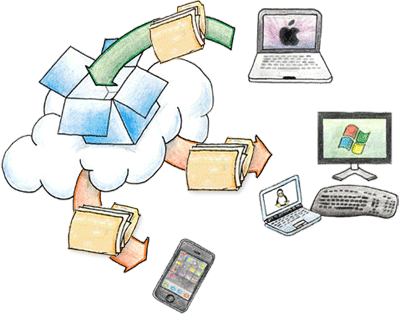
Dropbox is a popular, free cloud storage service that lets users upload their files and data. The services supports almost every known file extension, ranging from large videos to small word documents. Once uploaded, users can access these files from anywhere in the world by simply logging on to their Dropbox account.

You can easily share the files on the go with friends and family. One of the best things about Dropbox is the ability to work on your slides in real time with coworkers, which also allows you to keep track of any changes you make to your document.

Let’s get started with the basics of using your Dropbox account.

Creating an account

To get a Dropbox account, simply visit www.dropbox.com. Scroll down the homepage and enter your name, email address and password, agree to the Dropbox terms and conditions by checking the box and press Sign Up. The website will prompt you to download the Dropbox installer for your PC, but you can choose to ignore it.

If it becomes too cumbersome, simply go to www.dropbox.com/home. Here you can immediately begin uploading important documents and videos by clicking on the Upload files button at the top right of your screen. A window will pop up where you can navigate to your document and then clicking on Open.

The free, basic account will give you a space of 2 GB, you can upgrade at any time to gain access to a mammoth 1 TB of space. Furthermore, you can add more free space to your account by referring the service to others.

The upload process can take from a few seconds all the way to a couple of hours depending on the internet’s speed and file size.

Share with friends and coworkers

All the list of uploaded files will be displayed on the home page, to share one of these documents, simply hover over to them and a small box will appear, clicking on the box will change it to a ‘tick’ sign. You will then be requested to verify your email address if you haven’t already done so .

Now simply click on the Share button at the top right of the screen. A dialog box will appear asking you to write down the names or email addresses of the persons you want to share the file with.

Alternative options include creating links, access to them will allow anyone to download or view your documents.

Active Collaboration using Dropbox

To avail this service, you will need to either create a new Dropbox account or convert your existing one to a Work Dropbox account. The free version will net you 2GB of space. On the homepage, at the top left side of the screen click on the Paper option, and choose one of the two options to gain access to Paper Dropbox.

To start work on a new document, click on the Create new doc option which will immediately take you to a page where you can begin writing your story. A tutorial will brief you on the basics of document writing, such as changing the font size, highlighting text and uploading images.

You can now invite your coworkers to actively work with you on these documents, seamlessly and effortlessly.

Filed Under: Life Tools, Tech Stuff

Best Mac Computer Tools

June 16, 2017 by Jaime

Regardless of whose side you’re on, operating systems sure owe it to Macintosh. It was the one that added the much-needed bit of spark into those dry and eerie old DOS systems. Things, since then, have never been the same. Today, we live in a tech-savvy world with gadgets that were only a figment of our parent’s imaginations. We’ve come far, but what about the Mac?

Best Mac Computer ToolsMac is one of the biggest operating systems in the world today, and enjoys one of the largest application stores. To help you better comprehend the broad variety of exciting applications it offers, we have handpicked the best Mac computer tools for you.

Caffeine

Just like every other human being, computers also need their daily dose of caffeine, or else they “sleep”. This application will keep your Mac up and running for hours. You can use it to keep the monitor from going dark or taking you to those annoying screensavers. It gets worse if you are reading, and are about to unveil that punchline of the story before the screen goes dim or dies altogether.

In short, stop tapping the mouse pad every once in a while, get a coffee, sit back, and read your favorite blog, or story, without worrying about the screen turning off.

Hearthstone

There are so many games the Mac offers. If you’re looking for one that truly helps you pass a great time, go download Hearthstone. There are some people who don’t like the game, but over forty million people think otherwise. It is an arcade game where you earn cards for playing daily requests.

Another way to acquire these cards is to fight a fellow gamer. The goal is to collect as much rare and valuable cards in order to clear the level. There must be something truly enticing about Hearthstone that such a great majority has fallen in love with it.

Evernote

You cannot undermine the importance of having everything planned beforehand. Being proactive makes it easier to meet deadlines—something that can be done with Evernote. It is easily one of the most practical applications you can have on your Mac.

What makes this application a must-have is how simple and organized it is. If you’re looking to keep your routine in check and manage your life at your fingertips, Evernote is the perfect solution at your disposal.

Pixelmator

Everyone who owns a Mac is obliged to have some sort of editing software in it. This is where Pixelmator comes into play. Install this application and say goodbye to low-quality pictures. Pixelmator is easily one of the best Mac computer tools you can find in the Mac library.

From mind-boggling features to the ease of use, everything adds up to help this application stand out from the bunch. Another reason why it is a favorite among so many editors is its processing speed. Pixelmator is arguably one of the fastest image editing applications you can find.

So, there are some of the best Mac computer tools you’ve been looking for. Download them now and enjoy the true essence of Mac.

Filed Under: Other Tools, Tech Stuff

  • « Go to Previous Page
  • Page 1
  • Interim pages omitted …
  • Page 4
  • Page 5
  • Page 6

Primary Sidebar

Hey! I’m Jaime!

Welcome to Journey Tool Kit! I'm an outdoorsy kinda guy who loves to travel. I like to stay on top of my game in both my life and travels. So I've put together this blog to share my ultimate tools for lifestyle, finances and travel!

Feel free to let me know if you have any questions or what you struggle with so that I can better share my tool belt with you!

[custom-facebook-feed]

More Posts

Ultimate Guide to Los Cabos, Mexico

I want to travel the whole world

I Want to Travel the Whole World

How Much Would it Cost to Travel the World

How Much Would it Cost to Travel the World

Best Travel Gadgets for Backpackers

Best Travel Gadgets for Backpackers

Travel Smart: Comparing Flight Options from Chennai to Melbourne

4 Travel Tips for Seniors in 2025

What’s Your Path? The Ultimate Guide to Relocate to Portugal

Do Cruise Ships Have Cabins With Private Bathtubs?

3 Things To Do When Spending Time With A Terminally Ill Loved One

Beyond the Classics: What Hidden Dimensions Await You in Paris’s Immersive Adventures?

Streaming Services vs. Cable TV: Entertainment Choices for Seniors

3 Things to Know Before Traveling to a Third World Country

Footer

Categories

  • Design Tools
  • Life Tools
  • Other Tools
  • Tech Stuff
  • Travel Blog
  • Travel Tools

Recent Posts

  • Travel Smart: Comparing Flight Options from Chennai to Melbourne
  • 4 Travel Tips for Seniors in 2025
  • What’s Your Path? The Ultimate Guide to Relocate to Portugal
  • Do Cruise Ships Have Cabins With Private Bathtubs?
  • 3 Things To Do When Spending Time With A Terminally Ill Loved One

Sign Up for the Latest Tools

Don't miss out on the latest lifestyle and travel tools!

© 2026 · Journey Tool Kit